Showing posts with label Tech News. Show all posts

Monday, February 16, 2026

Tech News: Is Windows 12 around the corner?

Thats the big question running around the PC industry speculating if Microsoft has a big surprise that's soon to be released.

Corporations likes to keep secrets until the last moment, and Microsoft is no exception with rumors swirling around that the software giant is working on Windows 12.

According to some reports, the next major version of Windows is going to launch at some point in late fall of 2026, roughly 5 years after Windows 11's debut. 

It's rumored that Microsoft will be pushing their "CoPilot", which is their AI version. (Think ChatGPT or Gemini wrapped up in an operating system)  

That's all the info that's out for now, and it might be a while before there's any more information. If past releases are any indication, Windows 12 should arrive in the fall, or at least the second half of the year, but that's not set in stone.

(By the way, Windows 10 support officially ended this past October 2025......Time flies, right?)

So how did this all come about? It started with a leaked document from Intel, referencing their CPU Meteor Lake chipset compatibility on the Windows platform and it mentions Windows 12 in the compatibility list.

Microsoft has denied the reports that it's working on Windows 12 but considering we're still some time away from its launch, the company could simply be holding its cards close to its chest.

Microsoft will likely keep labeling them as Windows 11 features until we're much closer to the release date.

Not every feature in the Insider Program will be part of Windows 12, though, as many of them roll out via smaller updates, but some of them may be looking further ahead. After all, Windows 11 was a fairly well-kept secret until it was almost finished.

In the meantime, enjoy the newest features released in Windows 25H2 here.


Sunday, April 2, 2023

Tech News: Artificial Intelligence - OpenAi ChatGPT

 There's a whole lot of buzz in the news today concerning Artificial Intelligence models.

Artificial intelligence (AI) is intelligence demonstrated by machines, think chess games that you play against a computer. Over a series of chess games, the computer "learns" about the moves you make in the previous games and then "thinks" about the next move you're going to make and makes its own moves accordingly.

Example tasks of AI is done include speech recognition, computer vision, translation between (natural) languages, as well as other mappings of inputs.

A rudimentary form of AI is in chatbots. 

Chatbots have actually been around for decades since A.L.I.C.E was developed in 1995, and back then it can be considered rudimentary in every sense of the word by today's standards.

Chatbots today have evolved into more refined programs and apps. Think "SURI" on an iPhone or Google Assistant on an Android device. Yes, these "Assistant" apps can be considered Chatbots. They can organize your day, make a shopping list, schedule appointments, tell jokes and stories and even sing to you.

However, a company called OpenAI has been making headlines in the tech industry with ChatGPT and GPT4.

GPT4 is an advanced version of ChatGPT.


This AI model has the potential of doing a limitless number of tasks.
Create a mortgage calculator.
Get advice on creating a business.
Create a marketing plan of your business.
Create a webpage for your business.
Use the AI to correct coding errors for you.
Create slogans for brands.
Create legal letters or Last Will & Testament
Create employment contracts.
Create a story.
Create a 7 day meal plan.
Write a best man wedding speech.
Write a Facebook post.
Get advice on Stock market investments.
Turn an email into a text.

And the list goes on and on!

Head over to ChatGPT | OpenAI to dive into this world of Artificial Intelligence.
You need to create an account first which is free.

There's plenty of online tutorials on using ChatGPT, however I found Santrel Media on Youtube a very useful tutorial on how to be a ChatGPT "power user" within 30 minutes. 


So what's the future of Artificial Intelligence? 

Will we have a robot child in our homes like in the movie "AI", maybe fall in love with our AI assistant like in the movie "HER" or will the future be more menacing such as Terminator 3 Rise Of The Machines where "Skynet" becomes "self aware" and starts a nuclear war.

One thing is sure.... as AI systems and neural networks expand, ChatGPT and similar AI software will likely play a major role in shaping the future of homes and businesses alike.


Monday, January 30, 2023

Tech news: "The great tech layoff"

Last week all the major players of technology; Google, Microsoft, Amazon and Meta have all announced huge layoffs of workers. When we say huge, we're talking in the thousands.

Google laid off 12,000, Microsoft 10,000, and at Amazon 18,000.


According to layoffs.fyi and Insider's calculations, more than 65K workers have lost jobs so far in 2023.

Over at Apple, it's looking slightly brighter for the employees as Tim Cook took a 40% pay cut to avoid the layoffs.

On January 20, Sundar Pichai, CEO of Google parent Alphabet, announced layoffs that equal to about 6% of the company's total workforce.

So why the gauntlet of employee cuts?

Most industry watchers speculate that the pandemic had a major effect on the way consumers spend. 

During the Covid lockdown taking your wallet out for travel, restaurants and entertainment were off the table. Many industries were directly impacted by the pandemic, especially restaurant, airlines, cruises, media production, manufacturing, retail, oil, and gas.

So instead of the usual spending habits, people began looking at alternative ways of spending their dollar with the majority of purchases done online.

One source reported that in less than a year, from February 2020 to January 2021, the percentage of online sales to total retail sales nearly doubled, going from 19.1% to 36% boosting sales for major tech companies including Amazon, Google and Zoom. 

In fact, in 2021 the New York Times reported, the five tech superpowers — Amazon, Apple, Google, Microsoft and Facebook — had combined revenue of more than $1.2 trillion!


Major tech needed major workers to fill in needed positions quickly!

So here we are January 2023, almost 3 years since the lockdown began in the US. Retail stores, restaurants, and malls have long since reopened and consumers have since reverted back to their pre-pandemic spending habits. The sharp influx of online shopping has slowed down dramatically.

So now the major tech firms that had fattened their workforce now need to trim the fat. Mind you these tech firms aren't going anywhere, and some foresee a slow hiring trend in the next two years but as Sundar Pichai stated they're all "bound to go through difficult economic cycles."


Friday, November 12, 2021

Windows 11 has arrived!! (or will be coming to a computer near you)

You've heard about it. It's been in the tech news since June when Microsoft announce the latest version of Windows. 

Yes.... the folks over in Redmond did say Windows 10 was to be the last version of Windows as a "Windows As A Service" feature, but hey everybody likes "new and improved"!!

New and improved Windows 11 is.... and yet, in some ways it isn't. It's like a brand-new paint job on your 2010 sports car, the engine still runs decent, but it needs a tune-up. 

Windows 11 has a very sleek, clean look, but underneath there are still some bugs. 

Windows 11 Start Menu

One of the slickest options within Windows 11 is the Snap Layout. This enables individual windows to "snap" to a side or corner of your preference.

Granted, this was in previous versions of Windows, but slightly clumsy using the arrows on your keyboard and the "Windows" key.

The Taskbar icons are centered at the bottom as the default. If you like the old style at the bottom left you can change this within the Taskbar Settings. Right Click on the Taskbar to do this.


There are issues and bugs concerning this latest release of Windows. Many have to do with hardware, processor and printer issues.

This page describes many Windows 11 bugs.


The biggest issue many have is with Windows slowing down AMD Ryzen processors. This is a known issue with the L3 cache on the processors. AMD has released a chipset driver update and Microsoft released an update to address the L3 cache issue.
*Follow directions closely concerning these updates and issues.

Personally, I have been using Windows 11 for about 3 weeks now and have had just a few minor issues. (Daylight Savings Time not updating was one issue)

So if you're looking to install Windows 11 on your system, review and check to make sure your hardware supports it. Do your homework, and backup your files before taking the plunge.


Here are Microsoft's requirements for windows 11.

Your device must be running Windows 10, version 2004 or later, to upgrade. Free updates are available through Windows Update in Settings>Update and Security.

* Processor1 gigahertz (GHz) or faster with 2 or more cores on a compatible 64-bit processor or System on a Chip (SoC).
* RAM4 gigabyte (GB).
* Storage64 GB or larger storage device Note: See below under “More information on storage space to keep Windows 11 up-to-date” for more details.
* System firmwareUEFI, Secure Boot capable. Check here for information on how your PC might be able to meet this requirement.
* TPMTrusted Platform Module (TPM) version 2.0. Check here for instructions on how your PC might be enabled to meet this requirement.
 
Microsoft also has a convenient program to check if your system is compatible. You can download it here


Sunday, February 7, 2021

Tech News - Samsung Cloud Being Discontinued

Samsung offers Samsung Cloud, a mobile cloud storage service for owners that have a Samsung tablet or phone. However Samsung has announced some parts of this service will be discontinued.

Gallery Sync and My Files:
Both Gallery Sync and My Files are being retired. This means you won't be able to sync images and files to Samsung Cloud and any current images in your cloud storage will be deleted.

It's recommended you save any images or files which you have in Samsung Cloud , download them on a local device and backup to another Cloud/Backup site.

The changes to the service are being rolled out in two batches. For customers in the US, the services will stop working on April 1, 2021, and data will be deleted on June 30, 2021.


Tuesday, December 15, 2020

Tech News: US Dept Of Treasury and Dept Of Commerce email servers breached by Russian hackers

 In one of the most sophisticated and perhaps largest hacks in more than five years, email systems were breached at the Treasury and Commerce Departments. Other breaches are under investigation.

Russia-backed hackers infiltrated internal email systems at the US Treasury and Commerce departments, and were spying on email communications for months, possibly as far back as March.


The attacks, first reported by Reuters on Sunday, was apparently carried out by hackers from the SVR, Russia's foreign intelligence service.  In truth, no one knows where the damage ends; given the nature of the attack, literally thousands of companies and organizations have been at risk for months

The White House National Security Council, which reportedly held an emergency meeting on Saturday, said via spokesperson John Ullyot on Monday that it is collaborating with CISA, the FBI, and the intelligence community to respond with "a swift and effective whole-of-government recovery."

Original Article at https://www.wired.com/story/russia-solarwinds-supply-chain-hack-commerce-treasury/

Thursday, October 29, 2020

Tech News: FBI warns ransomware threatens healthcare sector

The FBI, Cybersecurity and Infrastructure Security Agency (CISA), and US-CERT (Computer Emergency Readiness Team.... a branch of Homeland Security) issued a joint alert which stated they had credible information of "an increased and imminent cybercrime to US hospitals and healthcare providers".

The alert stated malicious groups are targeting the public healthcare sector with the purpose of "data theft and disruption of healthcare services".

Ransomware is an specific attack on systems, servers and networks to scramble data and to literally hijack the data until the clients pay up. It may be found on personal PCs as an individual pop-up stating your computer has been infected and to "click here" to remove the infected file. 

However the moment you click on the pop up, a file lurking in the background starts scrambling and locking your data. The pop-up then gives you a notice to contact a phone number to remove the so called "infected" files..... which in reality your paying for tech support to unlock your files...... it's a very evil scheme.


Since the early 2000s, groups have been deviating from private individuals to targeting larger corporations for bigger pay. Major corporations (Norsk-Hydro/Lockergoga in 2019) and entire city governments (Atlanta/SamSam in 2019) have been attacked by ransomware.

A total of 59 U.S. health care providers or systems have been impacted by ransomware in 2020, disrupting patient care at up to 510 facilities.

The alert was posted so healthcare providers, IT and network administrators, can take necessary steps to protect their networks from such attacks.

Tuesday, February 18, 2020

Tech News: Microsoft's latest Windows update was apparently deleting files

Microsoft has had to issue a major warning to all Windows 10 users.

The last update was deleting files.

With update KB4532693 a serious issue was detected with a small group of Windows 10 users, but it's serious involving the loss of some user data such as the desktop and personal files. First off, it’s important to understand that this is simply based on a small but a growing number of user reports.

When it was released on Microsofts "Patch Tuesday", the Windows 10 KB4532693 security update was found to revert certain system settings to their defaults and also removes files from the desktop. 

Restoring some files
For many users, Windows 10 has renamed main user profile folder and files can be restored from C:\Users profile folder ending in .000 or .bak name, with new reports of user data being deleted. 

The update has now been pulled from Microsofts update page and is no longer available.

https://support.microsoft.com/en-us/help/4524244/security-update-for-windows-10-february-11-2020

Wednesday, February 12, 2020

The Billion Dollar Business Of Data Collection - Part II - Securing and/or Removing Access to Your Data

This is Part 2 of a 2 part article 

Part I here

Privacy
We all value our privacy and for obvious reasons we're not going to post our bank account, address and social security numbers on the internet. 


However, you may be surprised or maybe even shocked on just how much information about you can be found on the internet. 

Just drop your name on 'Thatsthem.com', 'Spokeo.com' or any other 'People Search" websites and you'll find information about yourself likely you'd rather not have public. 

A common thought is that once it's on the internet it's out there forever. 
But to a certain extent you can delete some of that information, or at least have it not available to the public. 

Limit your information on social websites
Social websites should be the first to limit your info. When applying for a job, often employers will drop in on Facebook or Twitter to determine just really who they could be hiring. 

Having a social account is one thing, but posting on Facebook about Fridays party with a picture of your best friend next to the toilet is another. 
Better yet, select and edit your privacy settings within Facebook..... choose WHO YOU WANT TO SEE YOUR POSTS. 
Check out the Facebook Privacy settings here. 
Facebook Privacy Settings

Twitter has a basically on/off approach when it comes to privacy and 'Tweets' 
Either the 'tweets' you post can be public or private. 
Twitter Privacy

Under the Safety section within Twitter settings, you have the option to prevent your tweets appearing in the search results of those you have blocked on the microblogging platform.


Google 
Make sure you visit your Google Account page, where there are a number of settings that can boost your privacy, reduce data collection, or remove you altogether from the searches. Privacy checkup: 

The Google Privacy checkup allows users to prevent Google from saving your searches and other Google activity to your Google Account, as well as turn off your location history. 


You can also choose to disallow Google from saving YouTube search & watch history and a record of videos you have watched, your contacts, device information, voice and audio activity including recordings harvested from interaction with Google Assistant, and other data. 


'Opt Out' from data collection firms
One of the more permanent actions to take to have a third party service remove your data from data collection sites. Two such services are Onerep.com and Deleteme.com.
Both services will conduct 'Opt Outs' for data collection firms. It's a tedious and time consuming but worth it when it involves your privacy.


Remove personal information from websites
If someone's posted sensitive information of yours such as a Social Security number or a bank account number and the webmaster of the site where it was posted won't remove it, you can send a legal request to Google to have it removed.

Google Data Removal Request

Depending on what kind of information/data we have of ourselves out there on the net we have to take certain steps to restrict, completely remove access, or totally delete that information.

Monday, January 27, 2020

Tech News: The Billion Dollar Business Of Data Collection - Part I

This is Part 1 of a 2 part article

Information is valuable....Personal data is worth billions.

Nearly every moment of our lives, we’re producing data about ourselves that companies profit from. Billions worth.

Personal data is often compared to oil—it powers today’s most profitable corporations, just like fossil fuels energized those of the past. But the consumers it’s extracted from often know little about how much of their information is collected, who gets to look at it, and what it’s worth. 
Every day, hundreds of companies you may not even know exist, gather facts about you, some more intimate than others. That information may then flow to academic researchers, hackers, law enforcement, and foreign nations—as well as plenty of companies trying to sell you stuff.


How is our data collected?
Our smartwatches know when we wake up, 
Alexa and Android Assistant listens to our conversations, our phones track where we go, Google knows what we email and search, Facebook knows what we share with friends, and our loyalty cards remember what we buy. 
We share all this data about ourselves because we like the services these companies provide, and business leaders tell us we must to make it possible for those services to be cheap or free.

In 2018 the nonprofit news organization ProPublica conducted an investigation on how medical devices obtain data. This data includes heart rates, sleep patterns, the number of steps taken in a day — and patients have been shocked at the ways that information is being used.


According to the investigation, the data that’s constantly collected by step counters, blood glucose monitors, medication alerts and trackers, in-home cameras, heart monitors and CPAP breathing machines is being packaged and sold for advertising, anonymized and used by IT companies, and even shared with health insurers, who can use it to deny reimbursement.

Facebook’s business has relied on the trade of data for free service since they started it in a dorm room nearly 15 years ago, but due to the Cambridge Analytica scandal, only recently it's has shown users about just how this works.

As a typical CEO, Mark Zuckerberg describes this as a win-win – people stay in touch with friends and family more often through a free service, and businesses can more efficiently spend marketing dollars to fuel corporate profits, making Facebook free to all.

But one party has benefited a lot more than anyone else: Facebook shareholders. 

Despite all the recent controversy, Facebook is still valued at nearly $500bn.

What Constitutes "Personal Data"?
“Personal data” is a pretty vague umbrella term, and it helps to unpack exactly what it means. Health records, social security numbers, and banking details make up the most sensitive information stored online. 
Social media posts, location data, and search-engine queries may also be revealing but are also typically monetized in a way that, say, your credit card number is not. Other kinds of data collection fall into separate categories—ones that may surprise you. Did you know some companies are analyzing the unique way you tap and fumble with your smartphone?


All this information is collected on a wide spectrum of consent: Sometimes the data is forked over knowingly, while in other scenarios users might not understand they’re giving up anything at all.


Who Buys, Sells, and Barters My Personal Data?
The trade-off between the data you give and the services you get, may or may not be worth it, but another breed of business amasses, analyzes, and sells your information without giving you anything at all: data brokers.

These firms compile info from publicly available sources like property records, marriage licenses, and court cases.
They may also gather your medical records, browsing history, social media connections, and online purchases. Depending on where you live, data brokers might even purchase your information from the Department of Motor Vehicles. Don’t have a driver’s license? Retail stores sell info to data brokers, too.

In part 2 we'll read what choices you (the consumer) have and what you can do about it.

Saturday, January 11, 2020

Tech News: LGs TV goes from a flat screen to curved

One of the "cool" factors you could show off in your house is having a TV morph from a flat screen to a curved TV with a press of a button.
The South Korean TV manufacture LG has just the screen for you.

At CES2020 it showed off a 4K OLED TV which morphed from a flat screen to curved in just a few seconds.


The display relies on bendable OLED which is a fairly new technology. This is the same technology that Samsung uses in their displays for the Galaxy Fold phone.

These types of screens use OLED ‘Organic Light Emitting Diode”. 
They’ve gained popularity because of the simplicity of the construction, superior image and most of all their flexibility. And as opposed to standard LED screens they don’t require a back light either.
These characteristics make OLED a superior choice for displays for TVs, smart phones and tablets. 

It’s safe to say that OLEDs will be replacing standard LEDs in the near future.


For more information on OLED technology check out 


Thursday, December 12, 2019

Tech News: How hackers are breaking into Ring security cameras

Hackers have created dedicated software for breaking into Ring security cameras, according to posts on hacking forums reviewed by Motherboard (Tech Site). The camera company is owned by Amazon, which has hundreds of partnerships with police departments around the country.

An incident that occured Wednesday in Desoto County Tennesee, found a mother of an 8 year old extreemly shaken after finding the Ring security camera was hacked into and the hacker spoke through the device's speakers with one of the children.

Local news agency WMC5 shows the video (courtesy of the family) what the hacker would have seen: A view of the entire room from where the camera is installed in a far corner, looking down on their beds and dressers while they play. The hacker is heard playing the song "Tiptoe Through the Tulips" through the device's speakers, and when one of the daughters, who is eight years old, stops and asks who's there, the hacker says, "It's Santa. It's your best friend."
Their camera now sits disconnected on their kitchen counter.


Owners of Ring security cameras in Mississippi, Georgia, Florida and Texas have reported incidents where hackers tormented families with racial slurs, encouraged children into destructive behavior and demanded a ransom in Bitcoin.

A few security measures to consider:
Like most IP security cameras, Ring cameras rely on your homes wireless internet connection. However this is easy to hack into as most logins,usernames and passwords are very weak. It's recommended to change the login info to stronger username and passwords.

For increased security make your home Wi-Fi so it's not visible to others. For your security camera apps (which are downloadable to your iPhone or Android phone) ensure Two Factor authorization. This incorporates having the app send a text with a code you enter during the login procedure on the camera app.

Monday, January 14, 2019

Tech News: The future of Android....and a colorful replacement called Fuchsia

Google is currently developing an Android replacement for Android and the OS already has a name.

Fuchsia is based on a new kernel called Zircon.. The project became known in 2016 on Github without any official announcement.

Fuchsia's user interface and apps are written with Flutter, a software development kit allowing cross-platform development abilities for Fuchsia, Android and iOS. Flutter produces apps based on Dart, offering apps with high performance that run at 120 frames per second.


Flutter also offers a Vulkan-based graphics rendering engine called "Escher", with specific support for "Volumetric soft shadows", an element that Ars Technica wrote "seems custom-built to run Google's shadow-heavy 'Material Design' interface guidelines".


Although it's more on the technical side, the documentation concerning Fuchsia is located at the Google Source website & Document Page.

Tuesday, December 4, 2018

Tech news - Samsung and Corporate Spying

Corporate espionage.

That's a nasty term in the business world and when it comes to new technology such as foldable display  patents, its evil and billions in sales are usually lost.

Such is the case with Samsung and a little known Chinese company named Toptec Co LTD.

Prosecutors for Samsung have indicted a chief executive and 8 employees of Toptec for leaking foldabLe display technology.

The group is accused of forming a separate shell company that received confidential information on the use of equipment and drawings of panels obtained from a Samsung subsidiary and which sold some of the documents in China for 15.5 billion won ($13.85 million), the prosecutors office said.

Prosecutors also stated Samsung Display invested 150 billion and over six years to develop the leaked foldable display technology of 3D lamination.

For the original Reuters article, click here

Monday, December 19, 2016

Tech News: Amazon makes it's first drone delivery in England

We've all seen the commercials.
Amazons cute little drones (I prefer the term quad-copter myself) delivering a package to an Amazon Prime customer within minutes of ordering on the company's web page.

The online retail giant conducted it's first drone delivery test on December 7th in Cambridge England. Delivery to the customer took just 13 minutes from the customer ordering online, and the drone flight from the company's fulfillment center, to the customers residence. The delivery falls under Amazons "Prime Air" trial.* In case you're wondering the order involved an Amazon Fire Stick and a bag of popcorn ;-D


Check out Amazons Prime Air Trial web page for more info on this cool delivery service.

* Amazon is only currently testing the drone delivery service in England. Currently FAA regulations prohibit commercial flights in the US, however Amazon is working with the FAA to seek it's approval in the US. 

Saturday, December 3, 2016

Tech News: Over 1 million Android phones hacked

Over 1.3 million Google accounts, which include photos, documents and email have been accessed by hackers by way of apps which were not available on Google Play Store.

Checkpoint, a cyber security firm, has named the hacking campaign "Googligan" and has set up a website named "Googligan Check Point" for consumers to determine if their Google accounts have been hacked.

The infection begins when a user downloads and installs a Gooligan-infected app on a vulnerable Android device, or by clicking on malicious links in phishing attack messages. Checkpoint states the code is targeted towards Android devices which have The Jelly Bean, Kit Kat, and Lollipop versions of Googles operating system.


Google has since removed the apps from thier Play Store, which contain the malicious code. However the attacks are still prominent as 3rd party websites still list apps that contain malware.


Android users have the option to download unofficial apps from 3rd party vendors and websites, but it is advised not to due to incidents like these.

Monday, November 10, 2014

Tech News: Windows 10 Technical Preview is here!

Windows 10 has arrived! Well at least in the form of a beta test called "Windows Technical Preview"

So alot of people are wondering what happened to Windows 9?
Initially there was a theory that Microsft avoiding the "9" title due to possible issues with the programming language relating to previous Windows  95 or 98. Again...that was just a theory.

The official word from the Redmond software giant is that "Windows 10 is not going to be an incremental step from Window 8.1," he explained. "Windows 10 is going to be a material step. We're trying to create one platform, one eco-system that unites as many of the devices from the small embedded Internet of Things, through tablets, through phones, through PCs and, ultimately, into the Xbox." according to Tony Prophet, Microsoft's corporate vice president.
So MS is trying to distance itself from the unpopular Windows 8.

Downloading Windows Technical Preview
You can download the preview here, However a word of caution. Once you install the operating system, you cannot go back to Windows 8 without re installing.
That being said it's highly recommended to install this on a secondary computer which you don't have any valuable files you don't want to lose.

But the most obvious bit of advice here, of course, is: Back up first, and create a recovery disk. In Windows 7, you will use Windows Backup for both. In Windows 8.x, you may need a third party utility, though that Windows 7 backup is there too. (Search for File History and then click "System Image Backup" in the lower-left corner of the File History control panel.) Search for "recovery drive" to create a recovery drive.

Getting Started
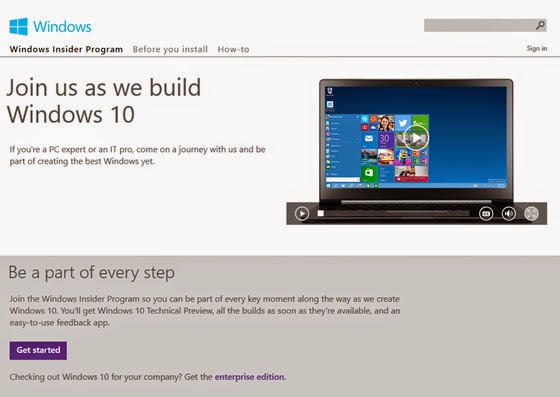
To install the Windows Technical Preview, you need to join the Windows Insider Program. So head on over to the Windows Insider Program web site and click the Get Started button.

You will find you have two choices of ISO files - a 32bit or a 64bit version.

If you're not sure which one to get, you can see which version you're currently using by right clicking 'My Computer' and clicking Properties. this will display your version of Windows. It will say "64-bit Operating System, x64-based processor" for 64-bit and "32-bit Operating System" otherwise. You will need the same type of OS version, especially if you're upgrading.

The ISO files are large, 3-4GBs. There's a few ways to install this on your system. Either by DVD, a USB drive or via a 'Virtual Machine' such as sandbox.

If you decide on the DVD or USB route copy it onto a USB or DVD.
When you're ready to install Windows Tech Preview, insert the USB drive or DVD with the ISO file on it and then run Setup.exe from the root folder on the drive.

The Installation
Win Tech Preview Licencing Agreement
The install typically takes 45minutes to 1 hour. Follow thru with the steps and accept the licencing agreement as well.


Win Tech Preview Ready screen

After Setup examines your system, you have one big choice to make. This screen assumes you wish to perform an in-place upgrade in which your current OS is upgraded to Windows Technical Preview, retaining all of your desktop applications and apps, and their settings, your OS settings and customization's, and your data.


Win Tech Preview Choices screen
If that is not what you want, click "Change what to keep." Then, in this screen, you will see the following options:

Keep Windows settings, personal files, and apps. The default, and what is called an in-place upgrade.

Keep personal files only. A migration, in which Setup backs up your documents and other data, clean installs Windows, and then returns your documents and other data to their original locations.

Nothing. A clean install, in which Setup erases your existing Windows install along with all of your settings, applications and data, and then installs a factory-fresh version of the Windows Technical Preview.

Your system will restart a few times and you will be prompted to choose between Express or Customer settings. I would recommend Express settings as they are configured for the basic Windows configuration. The next screen you will need to log into using your Microsoft/MSN/Hotmail account. Afterwards the screen will flash a few colors and the desktop will appear with the Start Menu and all it's glory


The Start Menu is obviously larger, and it’s more personal, more organized, and more fun than before. The Start Screen which was introduced with Windows 8, remains as well, and it's easy to switch between them. Your choice.

To get to the Start menu, click the Start button Windows Start button (or press the Start key on your keyboard). Then arrange it however you’d like. Pin folders, contacts, and go-to apps. Move and resize tiles or even resize the Start menu itself.


Friday, October 24, 2014

Tech News: Google announces Android 5.0 Lollipop

Googles latest version of the Android OS called Lollipop (Gotta love the naming scheme!) is being released officially on November 3rd.

Google has sent a message to app developers to start making their apps compatible with Android 5.0. Of course devices won't immediately have access to the OS as the rollout will depend on the manufacture of your device and your carrier. It's reported that Nexus series of devices will be shipped to retailers with Lollipop.


New features of Lollipop include new lock screen that comes with notifications that won’t force you to open up an app to take action on them. 
So for instance, you will be able to delete email messages from your device’s lock screen or from your notifications center now without having to actually open up Gmail to trash them.

Lollipop also includes whats called 'Material Design' which involves improved graphics, a cleaner design with the use of 'cards', responsive animations and transitions, padding, and depth effects such as lighting and shadows.

TechCruch posted a preview of a Nexus 6 with Lollipop.


Also added to Lollipop is Android TV support, 64bit chip support, Multiple Users across devices (including a Guest User), increased security and longer battery lifetime.

For more information check out Googles Official Lollipop page.

Friday, September 26, 2014

Tech News: Apple releases iPhone 6 & 6 Plus

The iPhone 6 and iPhone 6 Plus were released on September 19, 2014. Both iPhone 6 versions serves as a successor to the iPhone 5S and iPhone 5C. The iPhone 6 series includes a number of major changes which include a thinner design, faster processor, upgraded cameras and improved wireless connectivity. The iPhone 6 models was designed with a 4.7-inch screen and the iPhone 6 Plus comes with a larger 5.5-inch display.


The following specs relate to both iPhone 6 versions:

Phone Connectivity2G Network, 3G and 4G and LTE
SIM Card          Nano-SIM
Dimensions 158.1 x 77.8 x 7.1 mm (6.22 x 3.06 x 0.28 in)
Weight 172 g (6.07 oz)
DISPLAY   LED-backlit IPS LCD, capacitive touchscreen, 16M colors
Size          1080 x 1920 pixels, 5.5 inches (~401 ppi pixel density)
Multitouch Yes
SOUND/Alert types Vibration, proprietary ringtones
Loudspeaker Yes
3.5mm jack Yes
MEMORY  No external card slot - Internal16/64/128 GB, 1 GB RAM
DATA GPRS Yes
Speed DC-HSDPA, 42 Mbps; HSUPA, 5.76 Mbps; EV-DO Rev. A, up to 3.1 Mbps; LTE, Cat4, 150 Mbps DL, 50 Mbps UL
WLAN Wi-Fi 802.11 a/b/g/n/ac, dual-band, Wi-Fi hotspot
Bluetooth Yes v4.0
NFC          Yes (Apple Pay only)
USB          Yes v2.0
CAMERA Rear Facing - 8 MP, 3264 x 2448 pixels, optical image stabilization, phase detection autofocus, dual-LED (dual tone) flash, check quality
Video                 1080p@60fps, 720p@240fps, optical stabilization, check quality
Front Facing - 1.2 MP, 720p@30fps, face detection, HDR, FaceTime over                                     Wi-Fi or Cellular
OS iOS 8, upgradable to iOS 8.0.2
CPU Dual-core 1.4 GHz Cyclone (ARM v8-based) Chipset - Apple A8
GPU PowerVR GX6450 (quad-core graphics)
Sensors   Accelerometer, gyro, proximity, compass, barometer
Messaging  iMessage, SMS (threaded view), MMS, Email, Push Email
Browser            HTML5 (Safari)

GPS Yes, with A-GPS, GLONASS

Apple reported the pre-orders of the iPhone 6 series exceeded 4 million within its first 24 hours of availability—an Apple record. More than 10 million iPhone 6 series devices were sold in the first three days another Apple record. However the device itself has not been without it's share of criticism especially concerning the issue of the iPhone 6 Plus case bending under pressure. The design flaw is now known in social media circles as "Bendgate". The issue was first noted by a Youtube author named "Unbox Therapy" The iPhone 6 does not seem to be affected with the issue. Apple has stated you may be able to get your iPhone 6 Plus replaced, but will need to be inspected by Apple to determine eligibility. 

Tuesday, November 20, 2012

Tech News: Microsoft Surface or iPad? ....details and specs

For those who like the click.

It's light, it's got style, it's loaded with Microsofts' newest OS Windows 8 RT.
But the one question remains. Is it better than the iPad?

Microsoft has clearly spent a lot of time making this thing look and feel just right. The device is fully developed by the Redmond, WA company. Hardware and software.

The Surface isn’t flashy—it’s less outwardly gorgeous than the new iPad—but it is delightfully functional. It’s got a kickstand built invisibly into the device, and, even better, Microsoft created an ingenious case that includes a “pressure sensitive” touch keyboard right inside the cover. Of all the attributes, the keyboard is is the Surface’s killer attraction. You likely have seen the commercials and the sudden "click" of the keyboard locking in witht he screen. Classy


So how do does the Surface compare to Apple’s latest iPad?

Well, for starters, there are two versions of the Surface, an Nvidia Tegra 3-powered model running Windows RT (available now) and a more business-friendly Intel Core i5-powered model running Windows 8 Pro (likely coming in January).

Some other points of difference include storage size: the Surface with Windows RT comes with 32GB of built-in storage, double the amount inside the entry-level iPad (16GB). Plus, the Surface includes a microSD Card slot for expansion, something the iPad doesn’t offer. The Windows 8 Pro additional will start with 64GB.

Another feature that’s unique to the Surface is its full-size USB port, which should accommodate all sorts of peripherals. You can plug in everything from USB drives and printers to cameras.
Both the fourth-generation iPad and the Surface with Windows RT cost $499. Pricing for the Surface running Windows 8 Pro has yet to be announced. Check out the chart below to get a closer look at the differences between these tablets.

  
Device
iPad (Forth Generation)
Surface (Windows RT)
Surface (Windows 8 Pro)
Price$499 $499TBA
CPU Apple A6X dual-core Nvidia Tegra 3Intel Core i5
OSiOS 6Windows 8 RTWindows 8 Pro
Display9.7 inches
(2048 x 1536)
10.6 inches
(1366 x 768)
 10.6 inches
(1920 x 1080)
Size
(inches)
9.5 x 7.31 x 0.37.37 inches thick .53 inches thick
Weight (pounds) 1.44 1.49 1.99
Storage
(Built-In)
16GB, 32GB,
64GB
32GB, 64GB 64GB, 128GB
PortsLighting connectormicroSD, USB 2.0,
Micro HD Video, 2×2
MiMO Antenne
microSDXC, USB 3.0,
Mini DisplayPort, 2×2
MiMO Antenae